
Demo eNSP Lab Tasks
To use this Huawei eNSP Lab, you need a fully functional Huawei eNSP installation properly set up on your system. If you do not currently have an eNSP installation or prefer not to install and configure it yourself, you can alternatively book our Online Huawei eNSP, which provides you access to a preconfigured lab environment with all available eNSP labs and allows you to practice hands-on networking exercises directly through your browser without any local setup.
Startup File
Download and start the Topo file below and work through the exercises according to the instructions in the Tasks.
Download Huawei HCIA Datacom Demo eNSP Topo File Tasks
Topology

Tasks
| Task 1 | Configure the hostname of routers. Set an idle timeout of 30’000s for the console connection. |
| Task 2 | Configure all IP addresses according to the topology. The last octet of the IP address is the number of the router (e.g. IP address of Lo0 on R2 is 10.0.2.2) |
| Task 3 | Test the connectivity between the routers with ping. |
| Task 4 | Configure OSPF in area 0 between all routers and announce the loopback networks. |
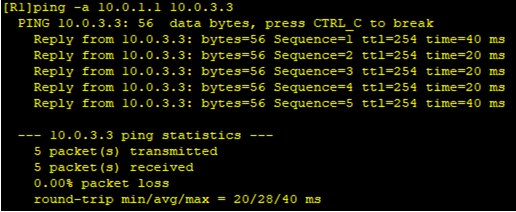
| Task 5 | Test the connectivity between all networks. Ping from R1 loopback 0 to R3 loopback network should look like this:
|
| Task 6 | Open Wireshark on R2 GE0/0/0 to see the OSPF hello packets. In which interval are the hello packets received from R1? |