

HTA-OSPF-01: Network Reachability Issue
Scenario
You just received the following email from your colleague and are asked to help him troubleshoot and resolve the issue.
Hi,
I hope you’re doing well.
I wanted to bring a network connectivity issue to your attention that I’ve been investigating this morning. We’re currently experiencing intermittent connectivity problems affecting several internal services and user endpoints.
From my initial checks, it looks like the issue may be related to unstable routing between the routers, but I haven’t been able to pinpoint the exact cause yet. I’ve already verified physical links and basic configurations, and everything appears normal on the surface. The following ping no longer works, but it was working last week.
<R1>ping -a 1.1.1.1 3.3.3.3PING 3.3.3.3: 56 data bytes, press CTRL_C to breakRequest time outRequest time outRequest time outRequest time outRequest time out
--- 3.3.3.3 ping statistics ---5 packet(s) transmitted0 packet(s) received100.00% packet loss
Could you please take a closer look when you have a moment? Your expertise on this would be really helpful to identify and resolve the root cause as quickly as possible.
Thanks in advance for your support!
Best regards,Alex CarterJunior Network Engineer
He's also provided you with a layout, various configuration templates, and different troubleshooting information.
Topology
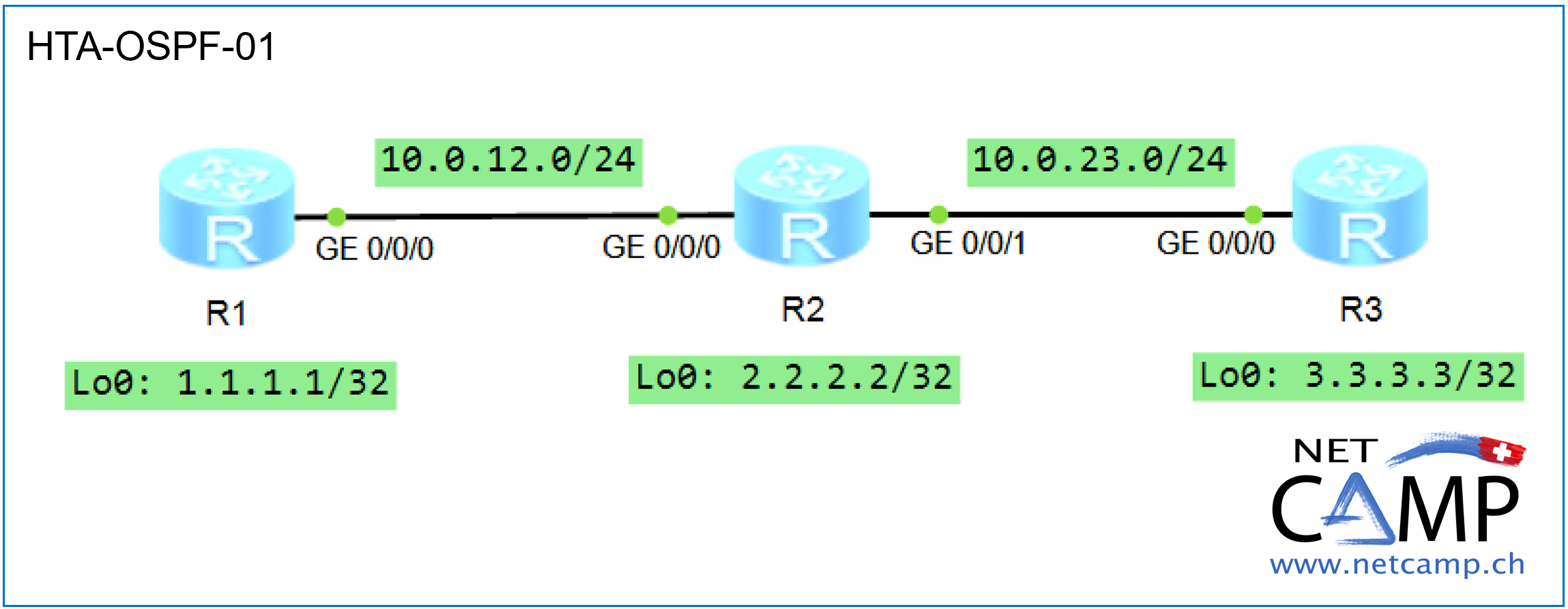
Configurations
# sysname R1# snmp-agent local-engineid 800007DB03000000000000 snmp-agent # clock timezone China-Standard-Time minus 08:00:00#portal local-server load portalpage.zip# drop illegal-mac alarm# set cpu-usage threshold 80 restore 75#aaa authentication-scheme default authorization-scheme default accounting-scheme default domain default domain default_admin local-user admin password cipher %$%$K8m.Nt84DZ}e#<0`8bmE3Uw}%$%$ local-user admin service-type http#firewall zone Local priority 15#interface GigabitEthernet0/0/0 ip address 10.0.12.1 255.255.255.0 #interface GigabitEthernet0/0/1#interface GigabitEthernet0/0/2#interface NULL0#interface LoopBack0 ip address 1.1.1.1 255.255.255.255 #ospf 1 silent-interface all area 0.0.0.0 network 1.1.1.1 0.0.0.0 network 10.0.12.0 0.0.0.255 #user-interface con 0 authentication-mode password idle-timeout 30000 0user-interface vty 0 4user-interface vty 16 20#wlan ac## sysname R2# snmp-agent local-engineid 800007DB03000000000000 snmp-agent # clock timezone China-Standard-Time minus 08:00:00#portal local-server load portalpage.zip# drop illegal-mac alarm# set cpu-usage threshold 80 restore 75#aaa authentication-scheme default authorization-scheme default accounting-scheme default domain default domain default_admin local-user admin password cipher %$%$K8m.Nt84DZ}e#<0`8bmE3Uw}%$%$ local-user admin service-type http#firewall zone Local priority 15#interface GigabitEthernet0/0/0 ip address 10.0.12.2 255.255.255.0 #interface GigabitEthernet0/0/1 ip address 10.0.23.2 255.255.255.0 #interface GigabitEthernet0/0/2#interface NULL0#interface LoopBack0 ip address 2.2.2.2 255.255.255.255 #ospf 42 area 0.0.0.0 network 2.2.2.2 0.0.0.0 network 10.0.12.0 0.0.0.255 network 10.0.23.0 0.0.0.255 #user-interface con 0 authentication-mode password idle-timeout 30000 0user-interface vty 0 4user-interface vty 16 20#wlan ac## sysname R3# snmp-agent local-engineid 800007DB03000000000000 snmp-agent # clock timezone China-Standard-Time minus 08:00:00#portal local-server load portalpage.zip# drop illegal-mac alarm# set cpu-usage threshold 80 restore 75#aaa authentication-scheme default authorization-scheme default accounting-scheme default domain default domain default_admin local-user admin password cipher %$%$K8m.Nt84DZ}e#<0`8bmE3Uw}%$%$ local-user admin service-type http#firewall zone Local priority 15#interface GigabitEthernet0/0/0 ip address 10.0.23.3 255.255.255.0 #interface GigabitEthernet0/0/1#interface GigabitEthernet0/0/2#interface NULL0#interface LoopBack0 ip address 3.3.3.3 255.255.255.255 #ospf 1 silent-interface all undo silent-interface GigabitEthernet0/0/0 area 0.0.0.0 network 3.3.3.3 0.0.0.0 network 10.0.23.0 0.0.0.255 #user-interface con 0 authentication-mode password idle-timeout 30000 0user-interface vty 0 4user-interface vty 16 20#wlan ac#Additional Information
<R1>ping 10.0.12.2 PING 10.0.12.2: 56 data bytes, press CTRL_C to break Reply from 10.0.12.2: bytes=56 Sequence=1 ttl=255 time=80 ms Reply from 10.0.12.2: bytes=56 Sequence=2 ttl=255 time=10 ms Reply from 10.0.12.2: bytes=56 Sequence=3 ttl=255 time=20 ms Reply from 10.0.12.2: bytes=56 Sequence=4 ttl=255 time=20 ms Reply from 10.0.12.2: bytes=56 Sequence=5 ttl=255 time=20 ms --- 10.0.12.2 ping statistics --- 5 packet(s) transmitted 5 packet(s) received 0.00% packet loss round-trip min/avg/max = 10/30/80 ms<R1>[R2]dis ip int brie*down: administratively down^down: standby(l): loopback(s): spoofingThe number of interface that is UP in Physical is 4The number of interface that is DOWN in Physical is 1The number of interface that is UP in Protocol is 4The number of interface that is DOWN in Protocol is 1Interface IP Address/Mask Physical Protocol GigabitEthernet0/0/0 10.0.12.2/24 up up GigabitEthernet0/0/1 10.0.23.2/24 up up GigabitEthernet0/0/2 unassigned down down LoopBack0 2.2.2.2/32 up up(s) NULL0 unassigned up up(s) [R2][R3]dis ip routing-table Route Flags: R - relay, D - download to fib------------------------------------------------------------------------------Routing Tables: Public Destinations : 10 Routes : 10 Destination/Mask Proto Pre Cost Flags NextHop Interface 2.2.2.2/32 OSPF 10 1 D 10.0.23.2 GigabitEthernet0/0/0 3.3.3.3/32 Direct 0 0 D 127.0.0.1 LoopBack0 10.0.12.0/24 OSPF 10 2 D 10.0.23.2 GigabitEthernet0/0/0 10.0.23.0/24 Direct 0 0 D 10.0.23.3 GigabitEthernet0/0/0 10.0.23.3/32 Direct 0 0 D 127.0.0.1 GigabitEthernet0/0/0 10.0.23.255/32 Direct 0 0 D 127.0.0.1 GigabitEthernet0/0/0 127.0.0.0/8 Direct 0 0 D 127.0.0.1 InLoopBack0 127.0.0.1/32 Direct 0 0 D 127.0.0.1 InLoopBack0127.255.255.255/32 Direct 0 0 D 127.0.0.1 InLoopBack0255.255.255.255/32 Direct 0 0 D 127.0.0.1 InLoopBack0[R3]Wireshark Captures
No Wireshark captures were provided.
View Expert Analysis
Based on the configurations and additional information, we can see the following:
- All IP addresses are configured correctly according to the layout - there are no typos.
- Router R3 has the OSPF routes from R2; there is a successful OSPF adjacency here.
- Router R1 can ping R2 - there is most likely no physical problem.
- It appears that there is no OSPF adjacency between R1 and R2. We would see this by running the
display ospf peercommand on R1 or R2.
Since we don't have direct access to the devices, let's take another look at the configuration templates for R1 and R2. We see that the MTU size is the same on both sides (if nothing is displayed, then it is the default value of 1500). The OSPF network type is also the same, which is Broadcast for an Ethernet interface. As previously verified, the IP addresses and, most importantly, the subnet masks are correct. Thus, the interface configurations appear to be correct.
However, if we now look at the OSPF configuration, we see that the silent-interface all command is configured on R1. As a result, by default, the router does not send OSPF hello packets on any interface and therefore does not establish OSPF adjacencies. It appears that the network engineer attempted to enable this security feature but configured it incorrectly or incompletely.
We can now either delete the command or, better yet, enable the G0/0/0 interface using the command undo silent-interface GigabitEthernet0/0/0. As soon as this command is configured on R1, the OSPF adjacency will come up immediately.