

In this article, we describe how to switch a Huawei access point (in this example, an AP5060DN) from Fit mode to Fat mode.
To copy the firmware image to the access point, we use an FTP server. The access point must be able to connect to this FTP server. The following commands are executed via the console. You can access the console using a USB-C cable* and terminal software (e.g. PuTTY). The serial settings must be configured as follows:
Baud rate: 9600 bit/s
Flow Control: None
Parity: None
Stop bits: 1
Data bits: 8
If all settings are correct, the access point output should be visible when the device boots up. After booting, the output “Press ENTER to get started” appears, indicating that the access point has started.
Change Fit to Fat Mode
| 1. |
Login and set password. Older firmware versions do not have a default user configured. In newer firmware versions, this is the user “admin” with the password “
|
| 2. |
With the currently installed Fit firmware version, the FTP download always aborts right at the start with an error message
Therefore, a workaround must first be implemented here to make it work. We will describe this workaround in the following steps. |
| 3. |
Start the access point using the backup firmware (if available). In this example, backup firmware is available that can be used to start the access point, and the mode change from Fit to Fat works via FTP.
|
| 4. |
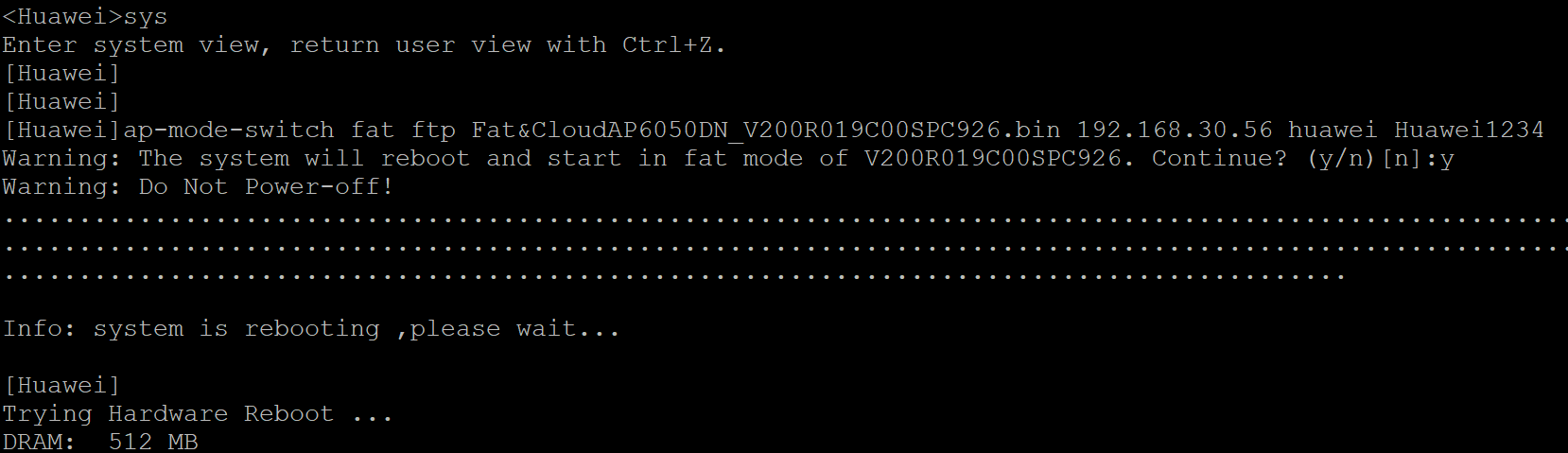
Switch the access point from Fit mode to Fat mode using FTP. The access point will then automatically reboot with the new firmware. In this example, the FTP server has the IP address 192.168.30.56 and the credentials huawei (username) and Huawei1234 (password).
|



Leave a Comment